Git Rebase For Nested Branches
If rebasing becomes tedious, you might be doing it wrong

Understanding Git rebase took me some time. Just as I was building confidence in my skills, I discovered that, sometimes, some rebases felt off. I had painful conflicts. Some of them were not even supposed to happen!
Worse, I could not tell why there were issues with those rebases, in particular. The chances are, I was doing something wrong.
The Nested Branch Issue
First, I recommend checking out my previous article to get more familiar with Git rebase:
I’ll take this opportunity to extend that article’s example. Assuming that my next task requires awesome_branch’s content, I’ll need to create a branch from it. I called it *nested_branch.
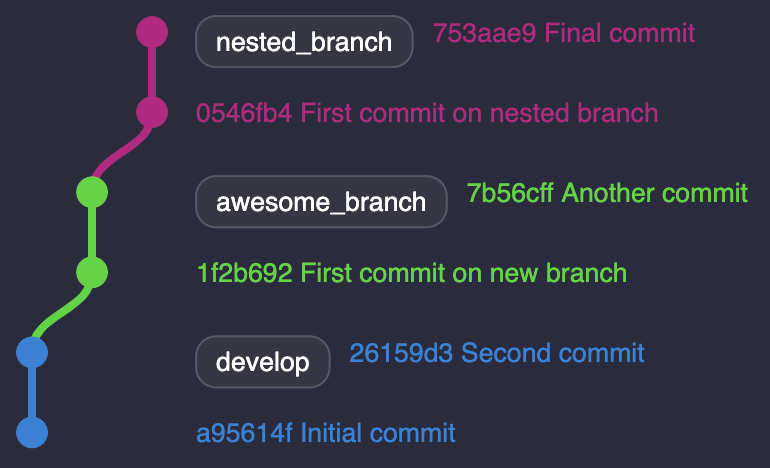
I’m aiming at merging both awesome_branch and nested_branch into develop. Before I can do so, my other branches have probably moved on. I’m likely to face one of the following situations:
-
develophas evolved, making bothawesome_branchandnested_branchbehinddevelop. -
Something comes up on
awesome_branchand new commits are needed.
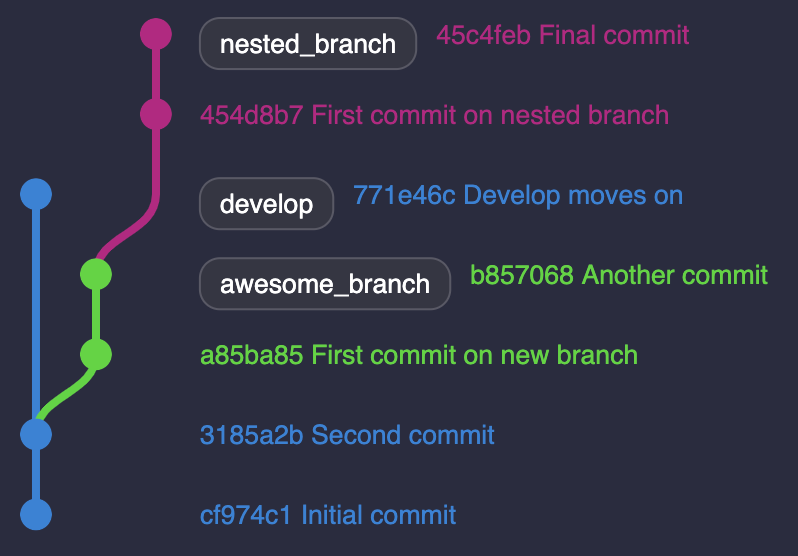
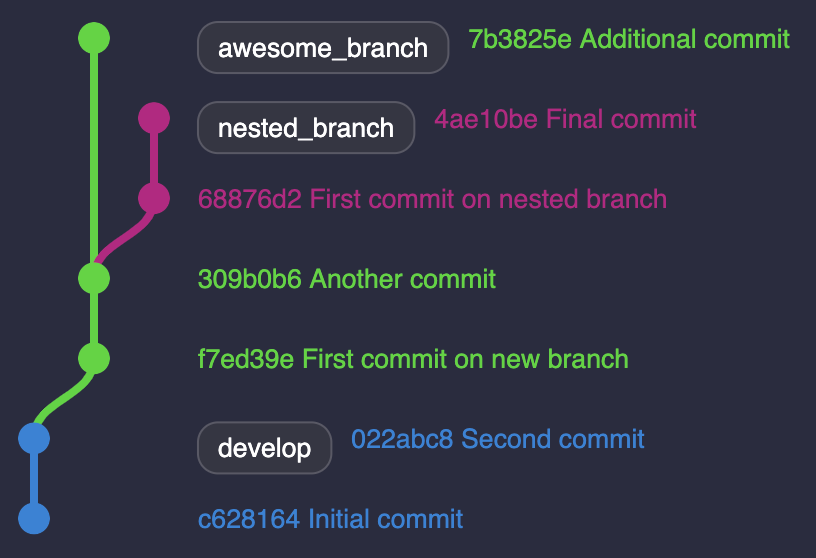
(1) requires me to rebase awesome_branch on develop* *before going any further. Same with (2) between nested_branch and awesome_branch.
Both situations won’t be an issue to merge awesome_branch eventually. Let’s follow up with (1) after merging awesome_branch:
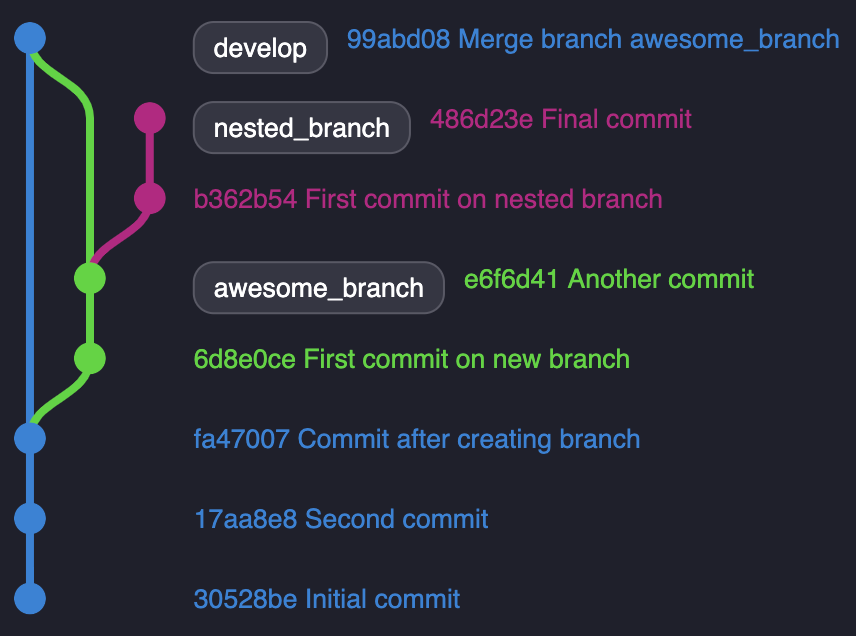
If I want to merge nested_branch into develop, I must first rebase it:
1
2
$ git fetch --all
$ git rebase origin/develop nested_branch
As I was resolving my conflicts, something felt odd. I suspected I would have to fix the same issues I encountered while rebasing awesome_branch on develop.
I could solve them again and get things done. But if, like me, you value your time, stay with me. It turns out I was failing at Git rebase and not the other way around.
Rebase Onto Any Branch
To rebase nested_branch on develop, you may have noticed nested_branch departs from awesome_branch. Simply rebasing on develop may yield unexpected results.
Fortunately, Git offers an option to rebase a branch onto any branch. You just need to find one specific commit hash.
Remember: Rebasing is merely moving a bunch of commits to a specific target.
Have a closer look at the tree above. We’re looking for the first commit where nested_branch starts. It matches the commit hash e6f6d41.
If like me, you enjoy using the command line, you can use git log —-graph. This command offers you a visual, colored graph. You can spot where your branch departs, as well as pick the commit hash.
Let’s try again by using the --onto option:
1
2
$ git fetch --all
$ git rebase --onto origin/develop e6f6d41 nested_branch
This command will rebase nested_branch onto develop from the commit hash e6f6d41.
Run it and congratulate yourself! No more previously fixed conflicts! Now I can merge nested_branch into develop.
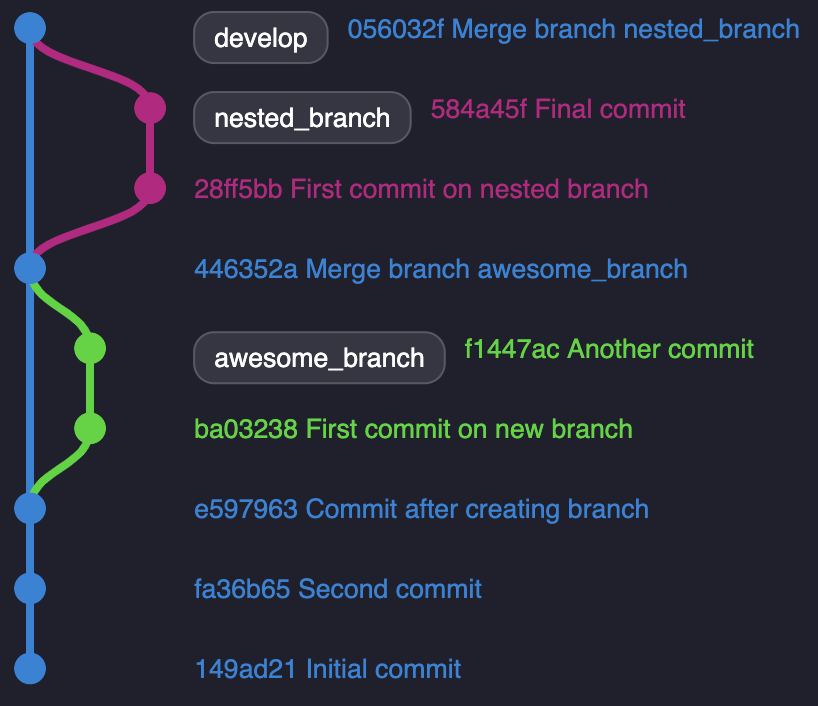
Let’s see the final tree:
Tips
With ohmyzsh aliases, rebase is even faster:
1
2
3
4
5
$ gco nested_branch                  // checkout your branch
$ gfa                                // fetch all branches
$ glgg                               // retrieve the hash commit
$ grb --onto origin/develop 849b03a  // rebase onto develop
$ gp -f                              // push force your local branch
Thanks for reading! I hope I’ve saved you some time and pain!
 Never miss a story, subscribe to my newsletter